

Every agency hits the same wall. One person holds the only login to the payout dashboard. A chatter accidentally sees a contract they shouldn't. The owner gets a 2 a.m. text asking for a password because the one person who knew it is on vacation. The fix isn't more trust. It's a role matrix: five core roles (owner, finance lead, chat manager, talent manager, chatter), each with clearly separated view and change rights, mapped against your most sensitive data.
What Roles and Permissions for Agency Teams Actually Means
Roles and permissions is the practice of deciding in advance who on your team can see which information and who can change it. In security terms, this mirrors role-based access control (RBAC), a model where access ties to a person's job function rather than a one-at-a-time approval process. Instead of asking "should Jamie have access to this?" every time a question comes up, you decide once what a chat manager role includes, and every chat manager inherits the same rights.
Two ideas sit underneath every good agency role setup.
View rights versus change rights. View rights let someone see information: a payout total, a contract term, a schedule. Change rights let someone edit, approve, or delete that same information. These are not the same permission. A talent manager might need to see a creator's earnings to coach performance, but that doesn't mean they should be able to edit the payout figure.
Least privilege and separation of duties. Least privilege means giving each role the minimum access needed to do its job, nothing more. Separation of duties means one person prepares a financial transaction and a different person approves it, so no one can both create and approve it alone. In a very small agency, the owner may be the exception. Neither is a specific legal mandate for most creator agencies, though data-protection laws such as GDPR can require limiting who can see personal data like payroll. Think of them as operational controls, the same logic a small business owner applies when they don't hand every employee a key to the safe. Done well, they reduce risk with minimal approval overhead.
Step 1: List the Roles Your Agency Actually Runs
Before touching a permissions setting anywhere, write down the actual jobs your agency has. Most creator agencies, even lean ones, run on five functional roles. Software roles can come later.
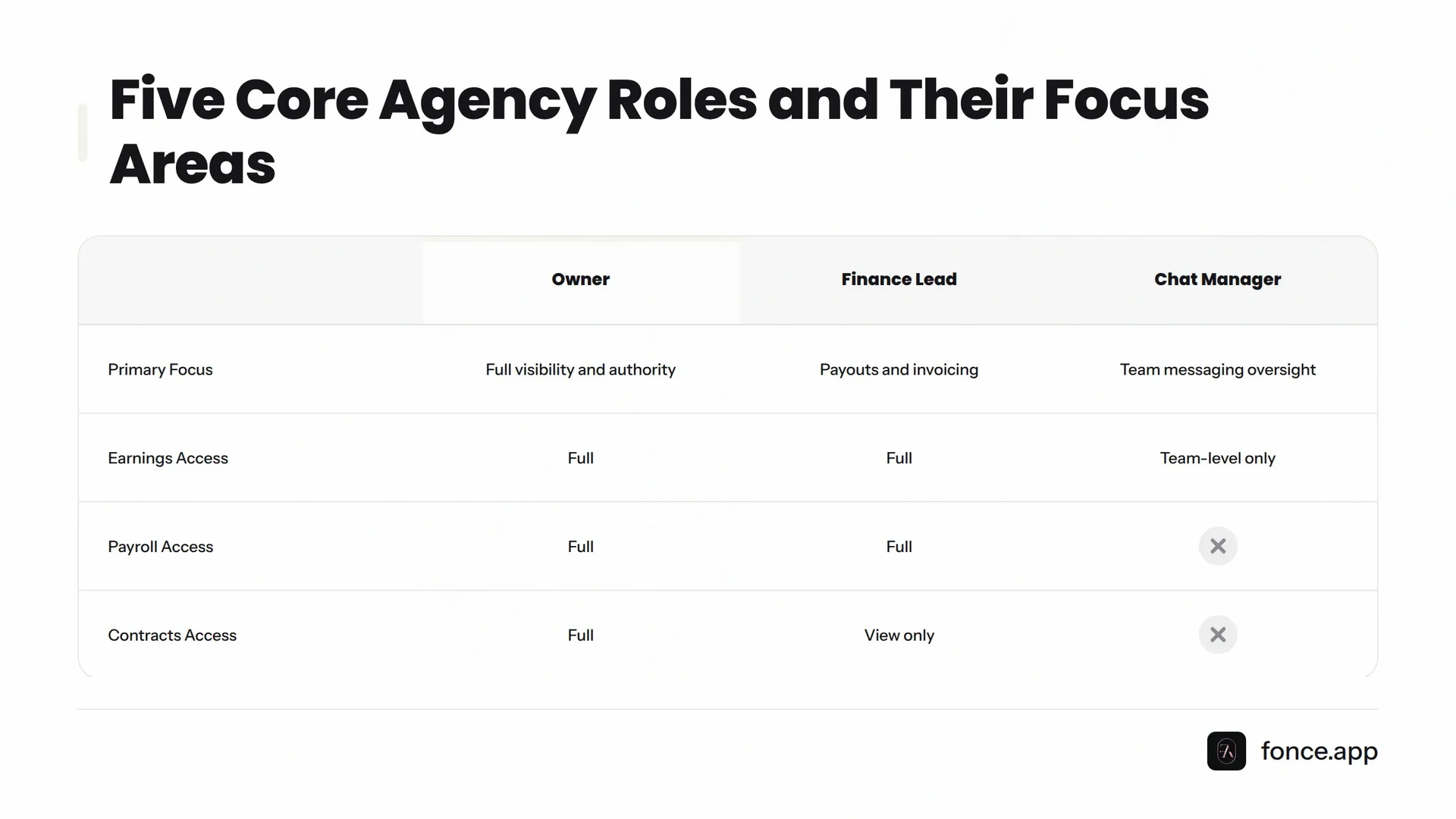
Owner. The owner carries full visibility and full authority: earnings, payroll, contracts, hiring, firing, vendor relationships. This is usually one person, sometimes two co-founders. Every other role in your matrix is a subset of what the owner can do.
Finance lead. The finance lead handles payout calculations, invoicing, and often payroll. They need to see and adjust earnings and payroll data as part of their daily work. Contracts are usually a view-only concern for finance, since contract terms affect how pay is calculated even if finance doesn't draft or sign them.
Chat manager. The chat manager oversees the people messaging on creator accounts day to day. They need visibility into chat performance and team-level revenue trends to coach chatters and allocate shifts. They generally don't need individual payroll numbers or contract terms to do this job well.
Talent manager. The talent manager is the relationship owner for each creator on the roster. They need to see individual earnings to have informed conversations with talent, and they often need to see contract terms since those terms shape what they can promise a creator. They should rarely need to edit payroll or earnings figures directly.
Chatter. The chatter executes the day-to-day messaging work. This role needs access to the chat platform and enough operational context to do the job (schedules, scripts, account guidelines) but has no legitimate reason to see agency-wide earnings, payroll figures, or contract terms.
Start small. Most agencies only need these five roles before they need more. Resist the urge to invent a sixth or seventh tier until you have a real, recurring job function that doesn't fit one of these five.
Step 2: Separate View Rights From Change Rights
Once your roles are listed, ask two separate questions instead of one: "What should this person see?" and "What should this person change?"
A chat manager might reasonably see a team's total earnings for the week because that number tells them whether the floor is performing. But that same chat manager has no business editing that number. Viewing a payout total and editing it are two different permissions. Bundling them together is how a scheduling mistake turns into a financial one.
This separation reduces risk without slowing anyone down. Most of what people need day to day is visibility, not editing power. A talent manager who can see a contract but not alter it still has everything they need. A chatter who can see their own shift schedule but not anyone else's payroll still has everything they need to show up and work.
Step 3: Map Each Role Against Sensitive Data
Every agency, regardless of size, handles three categories of information that deserve more scrutiny: earnings, payroll, and contracts.
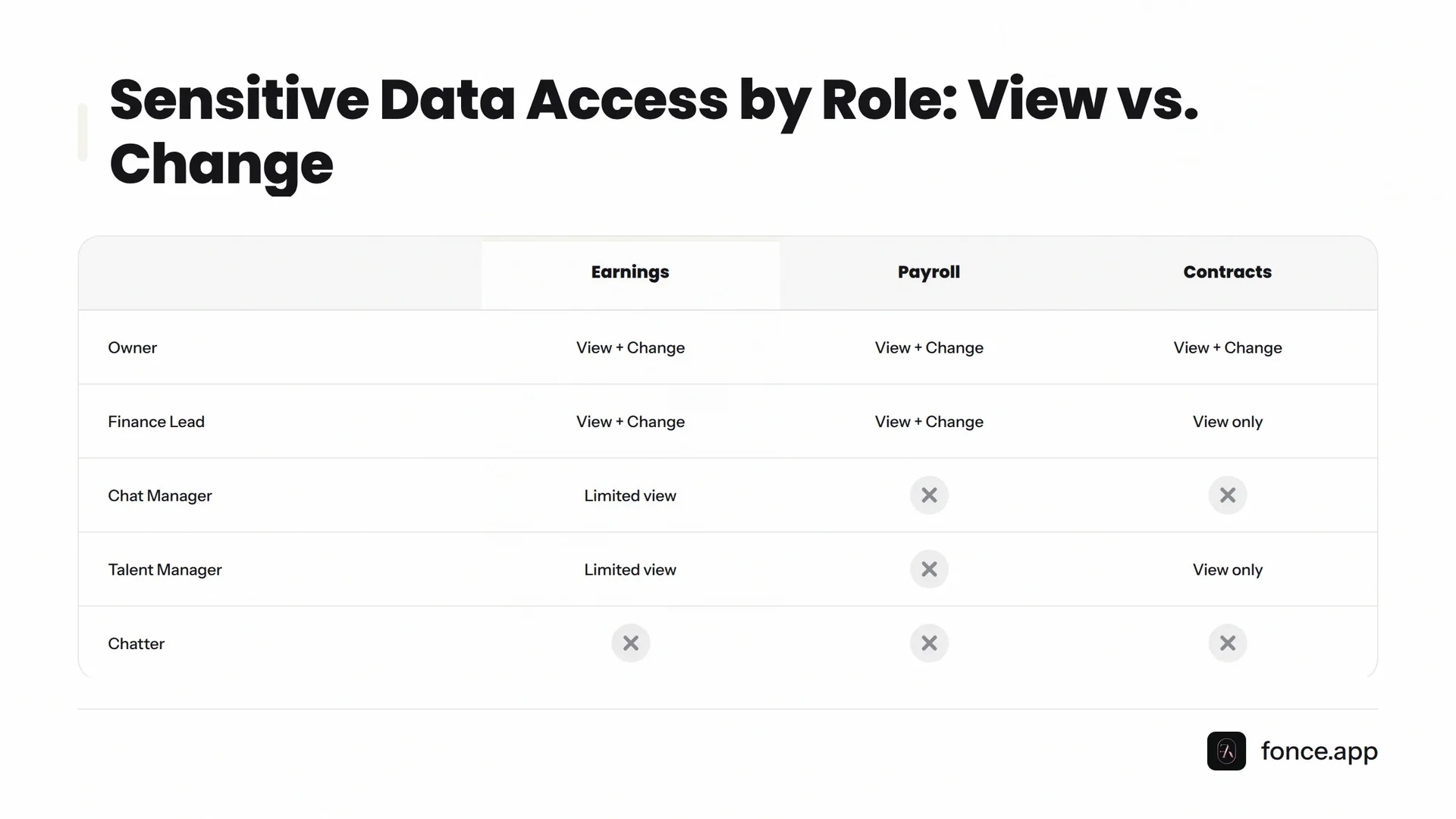
Earnings data covers per-creator and per-chatter revenue figures. The owner and finance lead need full view and change access. Talent managers typically need view access per creator they manage. Chat managers often need a limited, team-level view to track floor performance, without seeing individual creator breakdowns. Chatters generally don't need to see earnings data at all.
Payroll data covers what staff and chatters are actually paid. This should stay tighter than earnings data. The owner and finance lead are usually the only roles with change rights here, and in many agencies, even view access should stop at those two. Giving a chat manager or talent manager visibility into another employee's pay rate creates problems that have nothing to do with the business and everything to do with morale.
Contracts cover creator agreements, chatter agreements, and vendor terms. The owner holds full rights. The finance lead typically needs view access, since contract terms (splits, minimums, exclusivity clauses) affect how payouts are calculated. Talent managers often need view access to the contracts for creators they manage directly. Chat managers and chatters generally don't need contract access.
Before granting access to any of these three categories, ask yourself:
- Does this role need this data daily, or only occasionally?
- Does this access touch money or a legal term, rather than general operations?
- Would view-only access actually satisfy the need, instead of full change rights?
If the answer to the first question is "occasionally" and the third is "yes," you've probably found a role that should have view rights only.
Step 4: Build Your Role Matrix
With your roles listed and your data categories mapped, put it all in one table. This is the single most useful artifact to come out of this entire process, and it's worth building in a plain spreadsheet before you ever touch a software setting.
Here's a sample matrix. Treat it as an illustrative starting point, not a mandated standard. Your agency's size, headcount, and risk tolerance should shape your own version.
| Role | Earnings (View) | Earnings (Change) | Payroll (View) | Payroll (Change) | Contracts (View) | Contracts (Change) |
|---|---|---|---|---|---|---|
| Owner | Yes | Yes | Yes | Yes | Yes | Yes |
| Finance Lead | Yes | Yes | Yes | Yes | Yes | No |
| Chat Manager | Limited (team-level) | No | No | No | No | No |
| Talent Manager | Limited (per-creator) | No | No | No | Limited (per-creator) | No |
| Chatter | No | No | No | No | No | No |
Only the owner and finance lead carry change rights over payroll, which keeps the people who touch money to a small, accountable group. For separation of duties, have one of them prepare payroll and the other approve it. The chat manager and talent manager both get "limited" earnings visibility rather than a blanket yes, because each only needs the slice relevant to their job, not the whole agency's books. Chatters carry no access to any of the three sensitive categories.
Once this table exists, assigning a new hire's access becomes a lookup, not a judgment call. You already decided what a "chat manager" or "talent manager" gets.
Step 5: Assign Ownership for Exceptions and Shared Access
No matrix survives contact with reality perfectly. Someone goes on leave. A new hire needs temporary access before their formal role is finalized. A chat manager picks up finance tasks for a week while the finance lead is out. Build a clear answer for these situations before they happen.
Pick one person, usually the owner, who approves every exception. That means:
- Temporary access upgrades get a start date and an end date, not an open-ended "just for now."
- Dual-role situations get logged somewhere, even if it's a single shared document, so nobody forgets to revert the access later.
- Vacation coverage follows the same role matrix. The person covering gets the covered role's access, not blanket owner-level access "to be safe."
Shared logins defeat the entire purpose of a role matrix. If three chatters log into the same account, you've lost the ability to know who actually saw or changed what. If your team currently relies on shared credentials, treat eliminating them as the first real milestone after building your matrix.
Step 6: Review and Adjust Roles as the Agency Grows
A role matrix built today for eight people won't fit the same agency at thirty people. Set a review cadence and stick to it, rather than waiting for a problem to force the issue. Quarterly reviews work well for most agencies, with an extra review at any headcount milestone, say your first talent manager hire or your first full-time finance lead.
Watch for these signs that your current setup needs revision:
- Role creep: someone's day-to-day responsibilities have outgrown the access tier they were assigned at hire.
- New hires in gray areas: a new job function doesn't cleanly map to any of your five existing roles.
- New sensitive data types: you've started tracking something new that doesn't fit neatly into earnings, payroll, or contracts.
- Unused access: someone has change rights they haven't used in months, a sign the access was granted too broadly.
When someone leaves a role, their old access should be revoked the same day, not whenever someone remembers.
Who Should Have Access to What: Common Questions
What roles does a typical agency team need? Most creator agencies run on five core roles: owner, finance lead, chat manager, talent manager, and chatter. Larger agencies may split these further, but these five cover the functions nearly every agency needs before anything more specialized is justified.
What's the difference between view rights and change rights? View rights let someone see information, like an earnings total or a contract term. Change rights let someone edit, approve, or delete that same information. Treating these as two separate permissions is the foundation of a workable role matrix.
Who should be allowed to approve payouts? Payout approval should sit with the finance lead and the owner only. For separation of duties, the person who calculates a payout (usually the finance lead) shouldn't also approve it alone. The owner, or a second person, signs off.
What is separation of duties, and why does it matter for a small team? Separation of duties means no single person holds both the ability to create a financial transaction and the sole authority to approve it. In a very small agency, the owner may be the exception. For a small team, this isn't about distrust. It's about making sure one honest mistake, like a typo in a payout figure, gets caught before it becomes a real problem.
How many people should have change access to payroll? As few as possible, typically just the owner and the finance lead. Payroll is one of the most sensitive categories in any agency, and expanding change rights beyond a tight group increases risk without adding any real operational benefit.
How often should an agency review its role matrix? A quarterly review works for most agencies, with an additional review triggered at any major headcount milestone, such as hiring your first dedicated talent manager or finance lead.
What should happen to access when someone changes roles or leaves? Access should be updated or revoked the same day the change happens. A documented offboarding step, paired with your role matrix, prevents the common failure mode where a former employee or promoted staff member retains access they no longer need.
Next Steps
This guide covers the design process: listing roles, separating view from change rights, mapping sensitive data, building a matrix, handling exceptions, and reviewing over time.
If you're ready to put this matrix into practice, the next step is applying staff access controls once your roles are defined. For more operational guides like this one, the FONCÉ App blog covers agency operations topics this framework connects to.
Sources
Role-based access control - Wikipedia
Related: private by default security